[ fcp://@fc.onlinehelp.com,%237600229/En/OnlineHelp/Web%20Help/LW2 ]Contents [ fcp://@fc.onlinehelp.com,%237600229/En/OnlineHelp/Web%20Help/LW31 ][Image:81203_43854_21.png][ fcp://@fc.onlinehelp.com,%237600229/En/OnlineHelp/Web%20Help/LW42 ][Image:81203_43840_19.png] [Marker][ fcp://@fc.onlinehelp.com,%237600229/En/OnlineHelp/Web%20Help/LW32#The reading pane ]The reading pane [ fcp://@fc.onlinehelp.com,%237600229/En/OnlineHelp/Web%20Help/LW32#Opening the reading pane ]Opening the reading pane --------------- [Marker]The reading pane When the reading [ fcp://@fc.onlinehelp.com,%237600229/En/OnlineHelp/Definitions/L2018 ]pane is open, it is displayed under or to the right of the main pane. The reading pane displays the contents of any object selected in the main pane. For example, a selected message or document opens in this pane. You can work with objects in the reading pane just as you do when they are opened in the main pane. [ fcp://@fc.onlinehelp.com,%237600229/En/OnlineHelp/Web%20Help/LW32#Top ]Top --------------- [Marker]Opening the reading pane To open the reading pane, click this button: [Image:892006_13851_0.png] This button is only visible if you have the navigation pane open. It [ fcp://@fc.onlinehelp.com,%237600229/En/OnlineHelp/Definitions/L2035 ]toggles through three states. To move the reading pane to the right of the main pane, click this button again. To close the reading pane, click this button a third time. [ fcp://@fc.onlinehelp.com,%237600229/En/OnlineHelp/Web%20Help/LW32#Top ]Top
   
F3707
 
 
Home  •  Help  •  M0  •  Using FirstClass ED  •  FirstClass ED for Students  •  The Student's Classroom  •  F3707
41204_42505_0.pngReceiving news
Task list

9203_31904_3.png Traditional communication
It seems like every day the school sends home ten pages of notes for parents. Pizza orders, milk orders, school clubs, field trip information, weekly or monthly calendars, early release day, theme day, March Break camps...it doesn't end. The information may come from the school level or the teacher level, but you are always responsible for making sure your parents see them, and, when necessary, complete and return them.
9203_31904_3.pngCommunicating in FirstClass ED
FirstClass ED eliminates the time and resource costs of printing, photocopying, distributing, and collecting these forms on a daily basis by using a Class News area.
From here, information is posted in a series of messages. Parents can log into your account regularly and see what is coming up.
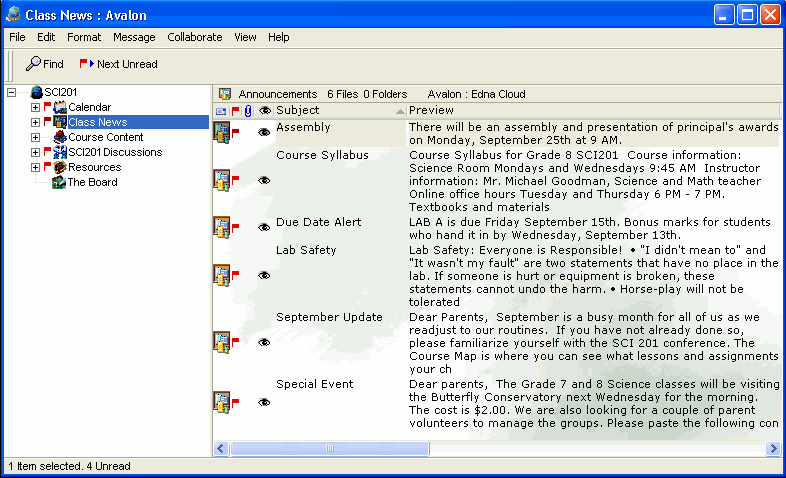
This is an example of a Class News area with various types of information for parents and students.
1252005_32120_0.png
9203_31904_3.pngHow to
You only have the ability to read items in this area.