[ fcp://@fc.onlinehelp.com,%237600229/En/OnlineHelp/Web%20Help/LW2 ]Contents [ fcp://@fc.onlinehelp.com,%237600229/En/OnlineHelp/Web%20Help/LW31 ][Image:81203_43854_21.png][ fcp://@fc.onlinehelp.com,%237600229/En/OnlineHelp/Web%20Help/LW42 ][Image:81203_43840_19.png] [Marker][ fcp://@fc.onlinehelp.com,%237600229/En/OnlineHelp/Web%20Help/LW32#The reading pane ]The reading pane [ fcp://@fc.onlinehelp.com,%237600229/En/OnlineHelp/Web%20Help/LW32#Opening the reading pane ]Opening the reading pane --------------- [Marker]The reading pane When the reading [ fcp://@fc.onlinehelp.com,%237600229/En/OnlineHelp/Definitions/L2018 ]pane is open, it is displayed under or to the right of the main pane. The reading pane displays the contents of any object selected in the main pane. For example, a selected message or document opens in this pane. You can work with objects in the reading pane just as you do when they are opened in the main pane. [ fcp://@fc.onlinehelp.com,%237600229/En/OnlineHelp/Web%20Help/LW32#Top ]Top --------------- [Marker]Opening the reading pane To open the reading pane, click this button: [Image:892006_13851_0.png] This button is only visible if you have the navigation pane open. It [ fcp://@fc.onlinehelp.com,%237600229/En/OnlineHelp/Definitions/L2035 ]toggles through three states. To move the reading pane to the right of the main pane, click this button again. To close the reading pane, click this button a third time. [ fcp://@fc.onlinehelp.com,%237600229/En/OnlineHelp/Web%20Help/LW32#Top ]Top
   
F3704
 
 
Home  •  Help  •  M0  •  Using FirstClass ED  •  FirstClass ED for Students  •  The Student's Classroom  •  F3704
41204_42505_0.pngManaging schedules
Task list

9203_31904_3.pngYour class calendar
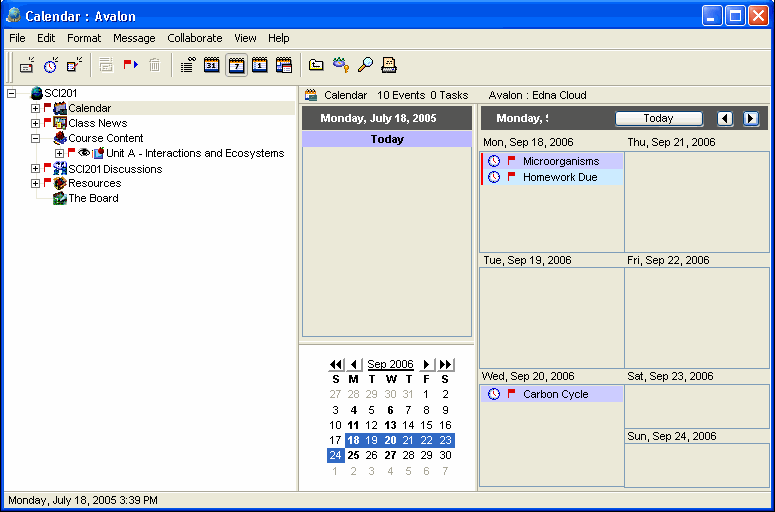
The class calendar in FirstClass ED contains due dates and dates for tests and special events. This forces you to take responsibility for your own participation in courses. This rules out concerns that you couldn't find your agenda, you forgot to bring it home, or you forgot to record the due date, because it is always online whenever you log into your account.  
Calendar entries may include additional information such as homework pages. If parents want to know what you have for homework or what is coming up, they can log into your account and look at the class calendar.
This example shows a class calendar a teacher may use regularly.
1252005_31656_0.png
9203_31904_3.png How to
The class calendar in FirstClass ED is a FirstClass group calendar and is used the same way as other standard FirstClass calendars. You only have access to read items in the class calendar.
Learn more about FirstClass calendars.