 Monitoring student work Monitoring student work Traditional student monitoring Traditional student monitoring"The practice of monitoring student learning is an essential component of high-quality education. The careful monitoring of student progress is shown in the literature to be one of the major factors differentiating effective schools and teachers from ineffective ones. The literature also states that effective monitoring of student progress is a strong predictor of student achievement." (Source)
Traditionally, student monitoring may involve:
• questioning students during classroom discussions to check their understanding of the material being taught
• circulating around the classroom during seatwork and engaging in one-to-one contact with students about their work
• assigning, collecting, and correcting homework; recording completion and grades
• conducting periodic reviews with students to confirm their grasp of learning material and identify gaps in their knowledge and understanding
• administering and correcting tests; recording scores
• reviewing student performance data collected and recorded and using this data to make needed adjustments in instruction.
FirstClass ED is a student monitorFirstClass ED assists you as you continue to monitor student work. "When progress monitoring is implemented correctly, the benefits are great for everyone involved. Some benefits include:
• accelerated learning because students are receiving more appropriate instruction
• documentation of student progress for accountability purposes
• more efficient communication with families and other professionals about students' progress
• higher expectations for students by teachers
• fewer Special Education referrals." (Source)
Questioning and other learning probes
"The term "learning probe" refers to a variety of ways that teachers can ask for brief student responses to lesson content so as to determine their understanding of what is being taught." (Source)
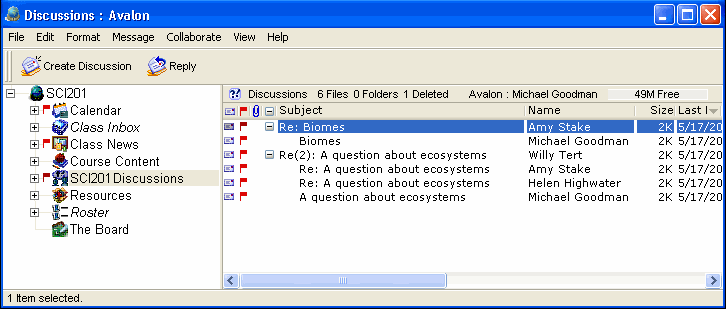
In addition to discussions in the classroom, you can post questions in the Discussions area of your FirstClass ED classroom and monitor the student responses. Students have a venue to discuss class topics at any time, at their convenience. Even shy students are likely to contribute because they feel more comfortable in this online environment. This is an effective way for students to elaborate on each others' answers, and for you to see who is contributing and who may need more attention.
 Once you understand each student's level of understanding, you can adjust your pace of instruction accordingly.
Monitoring homework
"The assignment of homework, like many educational practices, can be beneficial when administered appropriately. The use of homework assignments bears a significant and positive relationship to achievement when the homework is carefully monitored, as well as serving the function of increasing students' learning time." (Source)
Homework achieves the most beneficial results when assignments are:
• closely tied to the subject matter currently being studied in the classroom
FirstClass ED lets you provide a variety of assignments based on each lesson. You control the material each assignment covers.
• given frequently as a means of extending student practice time with new material
Using FirstClass ED, you can provide advanced assignments for extra credit, and additional assignments, resources, or practice work for students who need extra help. You determine the frequency of the assignments.
• appropriate to the ability and maturity levels of students
• clearly understood by students and parents
Students use FirstClass ED to complete and return the assignments online. Further, parents can access accounts to see the lessons and assignments for themselves.
• monitored by parents; i.e., when parents are aware of what needs to be done and encourage homework completion
Parents can log into their children's FirstClass ED accounts and see the same assignments and information as their children. This makes it easier for them to take an active role in their children's learning. If parents have questions about the assignment or their children's work, they can email the teacher or arrange a meeting. FirstClass ED makes it easier for parents to stay abreast of what their children are learning, what is required from them, and make sure work is completed on time.
• quickly checked and returned to students
• marked and commented on.
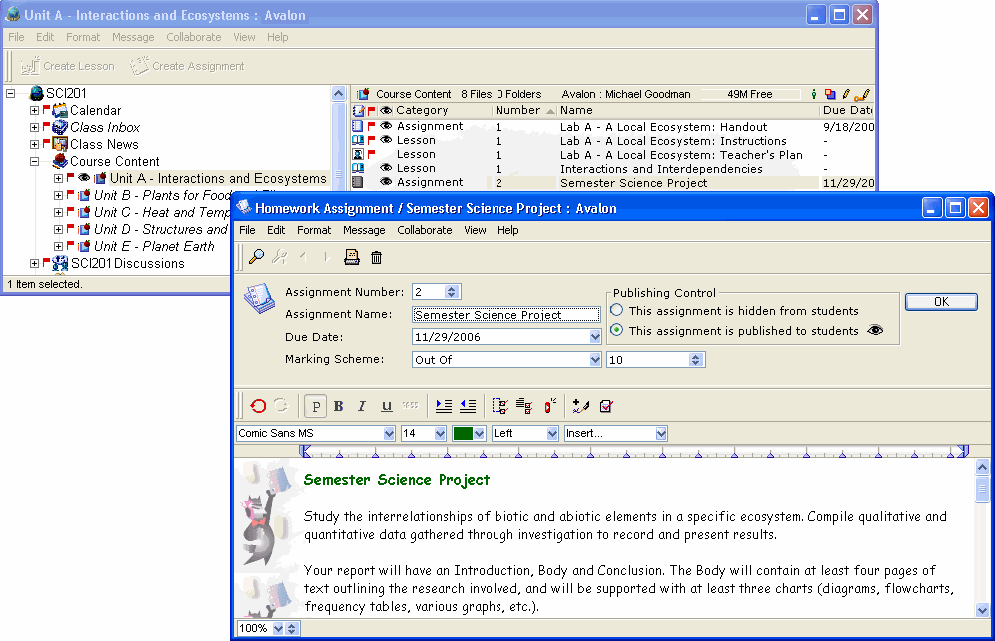
FirstClass ED may also decrease the time required to return assignments, because you spend less time gathering up assignments and dragging them around. You simply open the assignment in your Inbox, assign a mark, and click Reveal mark to student. This puts the homework back into the students' hands while the lesson is still fresh in their minds, and reduces the possibility of students absorbing incorrect answers as truth.
With FirstClass ED, you have a central location from which you can create the assignments. You determine the frequency of the assignments, the material the assignment covers, and when it is due.
 "The research also indicates that homework which meets these criteria is positively related to student attitudes. Students may say they don't like homework, but research shows that those who are assigned regular homework have more positive attitudes toward school, toward the particular subject areas in which homework is assigned, and toward homework itself, than students who have little or no homework." (Source) Reviewing student performance data
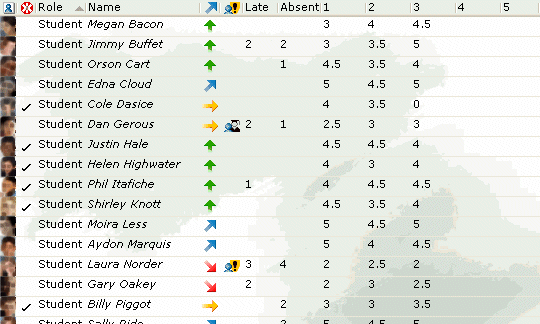
FirstClass ED lets you collect, score, and record the results of classwork, homework, tests, and so on. You can use the class roster to evaluate student assignments, monitor completion of work, and make note of participation in class discussions. You can use color to point out records that need attention.
The roster will tell you, at a glance, which students are succeeding and which are not. It will tell you which students are falling behind, not participating, need more advanced work, or need extra help. Furthermore, you can use the information in the class roster to prepare report cards and prepare for parent/teacher meetings.
 Combining monitoring methods
"Research findings on the discrete effects of various classroom monitoring methods comprise only part of the story of applying classroom monitoring techniques. Research also indicates that using these methods in combination is superior to using only one or two of them." (Source)
FirstClass ED provides a learning management system that lets you use multiple monitoring methods from a central location in order to effectively determine the level of success of your students.
| ||