You can change the appearance of a horizontal line by specifying: • the line thickness • the space above the line • the width of the line • the color of the line • whether the line is visible. To change the appearance of a horizontal line: 1 Select the line. 2 Choose Format > Format Horizontal Line. 3 Update the [ fcp://@fc.onlinehelp.com,%237600229/En/OnlineHelp/Form/307 ]Format Horizontal Line form.
   
F3702
 
 
Home  •  Help  •  W0  •  Using FirstClass ED  •  FirstClass ED for Students  •  FOV2-0000F40B  •  F3702
41204_42505_0.pngFollowing the lesson plan
Task list

9203_31904_3.pngThe Course Content area
You can use the Course Content area to  
•       view which lessons will be covered
•       take notes if you missed a class
•       view information about each lesson to help you with your assignments and to study for tests
•       receive assignments.
9203_31904_3.pngHow to
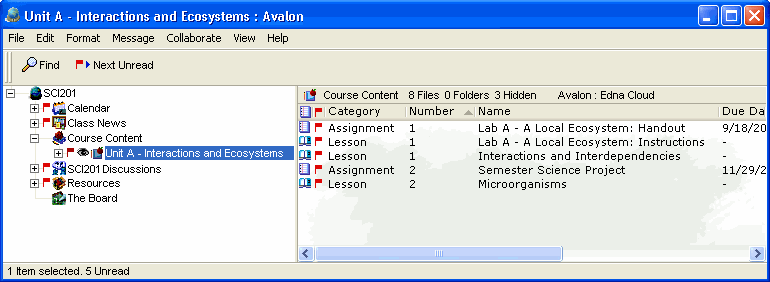
The Course Content area lists the lessons the teacher has made available for you to view. Open a specific module to see the lesson and any assignments the teacher has created.
This is an example of Course Content.
1252005_32635_0.png