 Track student participation Track student participationMinimum version: FirstClass 8.3 Audience: Teachers Experience:  FirstClass applications used:
 ConferencingMessaging ConferencingMessaging Summary SummaryWant to track how much your students are participating in class discussions? Post a question for discussion and follow the thread to see who contributes. Let students know they will be graded on their level of participation in the discussion.
ExampleJohn Smith is an English teacher at Avalon Academy. He wants students to discuss class topics among themselves and give everyone a chance to participate, so he starts an online discussion.
Follow discussion threads
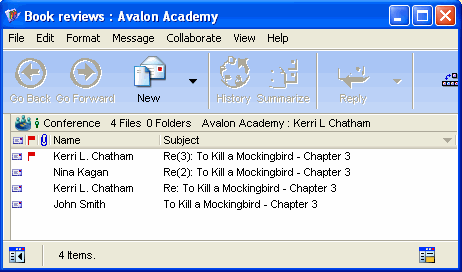
John posts a message in his class conference to start a discussion about the book his students are reading. Over the next couple of days he sees who is contributing to the discussion. He can then grade appropriately on participation.
 | ||