[Image:81903_22607_2.png]Book resources for a presentation Minimum version: FirstClass 8.3 Audience: Business professionals Experience: [Image:9203_22631_1.png] FirstClass applications used: [Image:9203_24337_3.png][ fcp://@fc.onlinehelp.com,%237600229/En/OnlineHelp/Client Help/Calendars ]Calendars [Image:9203_31709_1.png] Summary Looking for a simple way to organize the location and resources you need for your presentation? Consider using a FirstClass calendar. Instead of sending out printed memos and filling out request forms, you can use a group calendar in FirstClass to invite participants, reserve multimedia resources, and book locations. Here is a comparison of the conventional way you may book resources and how you would do it in FirstClass. [Image:92203_31828_0.png] [Image:9203_31709_1.png] Example Michael Green is vice president of Sales and Marketing at Husky Planes. Several times a year he showcases the company's newest products for his sales staff. His presentations usually consist of a promotional videotape from the Marketing department accompanied by a slide presentation. Michael schedules the presentation, invites members of the sales department, and books the boardroom and multimedia resources all at the same time. He doesn't have to leave his office to ensure that his presentation goes off without a hitch. Here are the steps he takes to handle the arrangements: STEP 1: Schedule presentation Michael schedules the presentation in the Sales Dept Calendar by creating a new event entitled New Product Promo. This is the new event he created. [Image:8102006_91145_0.png] STEP 2: Reserve venue Each resource or location Michael wishes to book has its own calendar. When he schedules an event, he simply enters the name of the resource calendar or location calendar on the Scheduling tab of the event he is booking. If there is a time conflict, it will show immediately and he can decide how to handle it. Michael reserves the company's mid-sized boardroom using the Scheduling tab. STEP 3: Reserve resources Michael also reserves a large screen television, a video cassette recorder, and a video projector. This is the Scheduling tab where he books the resources. [Image:882006_33623_2.png] When he entered his requests on the Resources tab for the New Products Promo event, a new event appeared in each item's calendar. Husky Planes' IT department monitors the resource and location calendars and ensures that requested equipment is ready for use when scheduled. This is the calendar for the video projector that John booked. [Image:882006_32721_0.png] STEP 4: Invite participants Michael invites the members of the sales department by entering their names on the Scheduling tab. From this screen, he sees who may have a time conflict. He adjusts the date and time as needed (the booked times for the resources and locations will also change automatically). The presentation will then appear in each of their personal calendars. This is the Scheduling tab where he invites participants. [Image:882006_33910_4.png] [Image:9203_31709_1.png] Variation If Michael has content he wishes to share before the presentation, he can attach it to the calendar event at the time of scheduling or type it in the text box on the event form. This is the event he created. He attached a file for review and included an agenda in the text area. [Image:882006_32224_4.png]
   
F1025
 
 
Home  •  Help  •  W0  •  Practical Uses for FirstClass  •  Developing Projects - Education  •  FOV2-0000F3E6  •  F1025
72203_112759_0.pngAssigning responsibility
You can teach valuable lessons in responsibility and ownership by letting students and student groups manage their own project conferences. They can plan their own meetings, either online or face to face, assign tasks among them and maintain the task status in the calendar for all to see, and submit deliverables to the appropriate subconference by the required date. Students can't argue that they couldn't attend a meeting or missed some information, because the information or meeting notes are always available in the project conference.
An important decision you need to make at the beginning of a project cycle is responsibility for tasks. You will carry some responsibility, such as deciding what types of projects students will produce during the school year, whether they will work in teams or alone, and how projects will be presented and showcased. However, team leaders and students with individual projects are responsible for the details of a project, such as managing tasks and information, scheduling, and organizing the final product.
 9203_31808_2.png Example: Assigning tasks
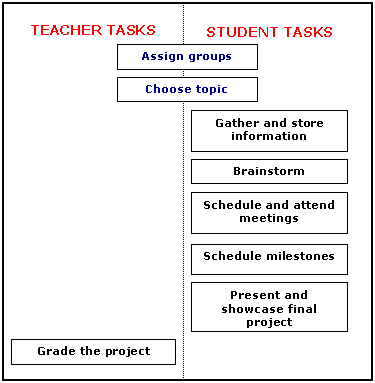
The English teacher at Avalon Academy created a chart to decide who would take responsibility for the various project tasks. You can create a similar chart to assign your own tasks.
61003_115909_1.png
He decided that he would work with the students to assign groups and choose topics, that students would be responsible for all further phases of the project, and that he would step in again at the end of the project cycle to grade the projects.
9203_31808_2.png Considering responsibility at the elementary grades
The age group of students will help you decide the amount of responsibility you choose to give them. Managing a conference may be too much responsibility for younger students. If you teach an early grade, you may wish to take a bigger role in project management. For example:
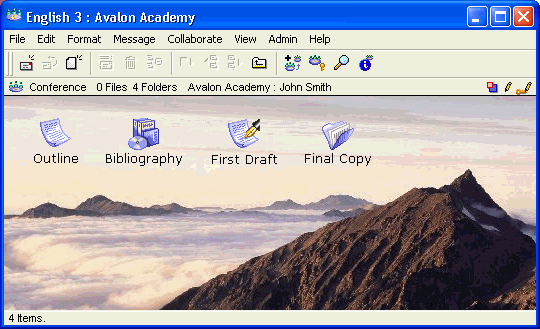
•       you can create one conference to manage all of the projects yourself
Within that project conference, you could include various subconferences for each of the different deliverables of the project, and a project calendar within the conference to schedule the timeline. Students would check the calendar and submit the appropriate deliverable to the respective conference by the scheduled time.
This is a sample conference that shows how a teacher may manage a project.
51403_14659_3.png
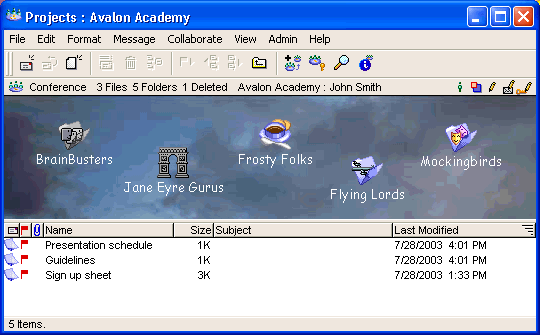
•       you can create a conference for each project, and manage them yourself
You could schedule the timeline in the class calendar rather than create a separate project calendar, and request that each student submit their deliverable to the appropriate project conference.
102003_114310_1.png

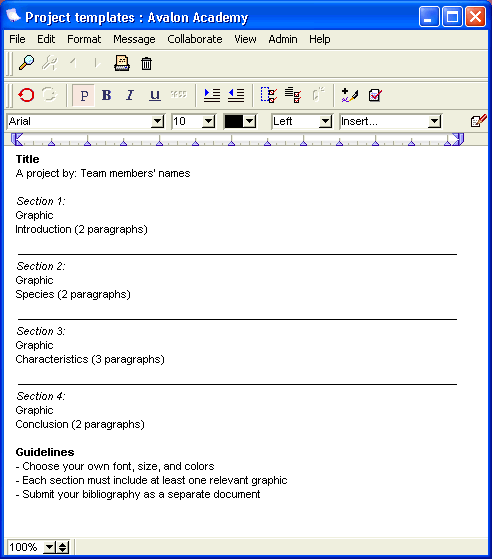
•       you can put together a template of a project and get students to fill it in.
You could have areas for the outline, introduction, body, conclusion, bibliography, graphics, and so on.
102003_114120_0.png