[Image:81903_22607_2.png]Book resources for a presentation Minimum version: FirstClass 8.3 Audience: Business professionals Experience: [Image:9203_22631_1.png] FirstClass applications used: [Image:9203_24337_3.png][ fcp://@fc.onlinehelp.com,%237600229/En/OnlineHelp/Client Help/Calendars ]Calendars [Image:9203_31709_1.png] Summary Looking for a simple way to organize the location and resources you need for your presentation? Consider using a FirstClass calendar. Instead of sending out printed memos and filling out request forms, you can use a group calendar in FirstClass to invite participants, reserve multimedia resources, and book locations. Here is a comparison of the conventional way you may book resources and how you would do it in FirstClass. [Image:92203_31828_0.png] [Image:9203_31709_1.png] Example Michael Green is vice president of Sales and Marketing at Husky Planes. Several times a year he showcases the company's newest products for his sales staff. His presentations usually consist of a promotional videotape from the Marketing department accompanied by a slide presentation. Michael schedules the presentation, invites members of the sales department, and books the boardroom and multimedia resources all at the same time. He doesn't have to leave his office to ensure that his presentation goes off without a hitch. Here are the steps he takes to handle the arrangements: STEP 1: Schedule presentation Michael schedules the presentation in the Sales Dept Calendar by creating a new event entitled New Product Promo. This is the new event he created. [Image:8102006_91145_0.png] STEP 2: Reserve venue Each resource or location Michael wishes to book has its own calendar. When he schedules an event, he simply enters the name of the resource calendar or location calendar on the Scheduling tab of the event he is booking. If there is a time conflict, it will show immediately and he can decide how to handle it. Michael reserves the company's mid-sized boardroom using the Scheduling tab. STEP 3: Reserve resources Michael also reserves a large screen television, a video cassette recorder, and a video projector. This is the Scheduling tab where he books the resources. [Image:882006_33623_2.png] When he entered his requests on the Resources tab for the New Products Promo event, a new event appeared in each item's calendar. Husky Planes' IT department monitors the resource and location calendars and ensures that requested equipment is ready for use when scheduled. This is the calendar for the video projector that John booked. [Image:882006_32721_0.png] STEP 4: Invite participants Michael invites the members of the sales department by entering their names on the Scheduling tab. From this screen, he sees who may have a time conflict. He adjusts the date and time as needed (the booked times for the resources and locations will also change automatically). The presentation will then appear in each of their personal calendars. This is the Scheduling tab where he invites participants. [Image:882006_33910_4.png] [Image:9203_31709_1.png] Variation If Michael has content he wishes to share before the presentation, he can attach it to the calendar event at the time of scheduling or type it in the text box on the event form. This is the event he created. He attached a file for review and included an agenda in the text area. [Image:882006_32224_4.png]
   
F4014
 
 
Home  •  Help  •  W0  •  Practical Uses for FirstClass  •  Project Management - Business  •  Project Stages  •  F4014
72203_112759_0.pngBrainstorming
Stages
 Traditional brainstorming
There are many ways to brainstorm. As a team, you may traditionally throw ideas out to let others build on, or use a graphic organizer such as a mind map.
9203_31808_2.png FirstClass brainstorming
When you are ready to brainstorm, you can gather as a team when convenient and conduct brainstorming sessions.
Just as there are many traditional ways to brainstorm, there are also many ways to do it using FirstClass.
•       Team members can meet in a public instant messaging session, instant message each other on-the-fly, or meet in a discussion conference. This is ideal when team members are on the road or working in separate locations. In an instant messaging session, team members can throw out ideas while the secretary records them in the graphic organizer, or the secretary can use the auto-generated transcript later to compile the ideas.
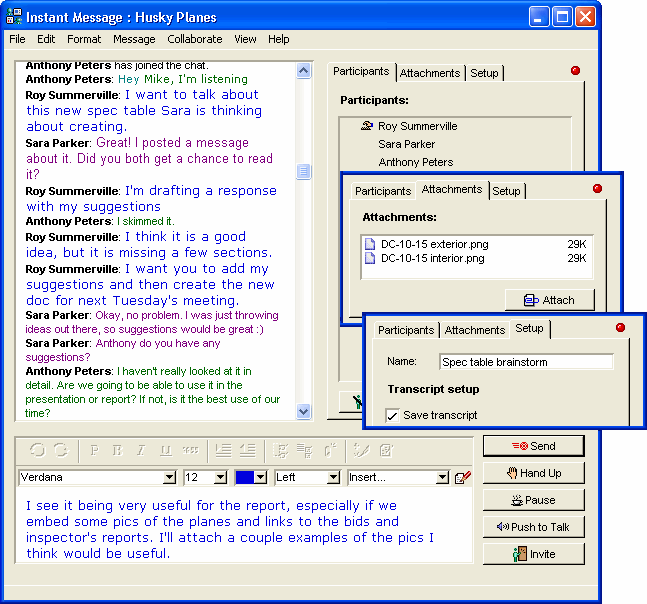
This is a sample brainstorming session conducted through instant messaging.
Right from the instant messaging session, team members can:
• see who's typing on the Participants tab
• share graphics on the Attachments tab
• use the Setup tab to automatically record and forward the transcript to a user or conference.
1102006_45135_0.png
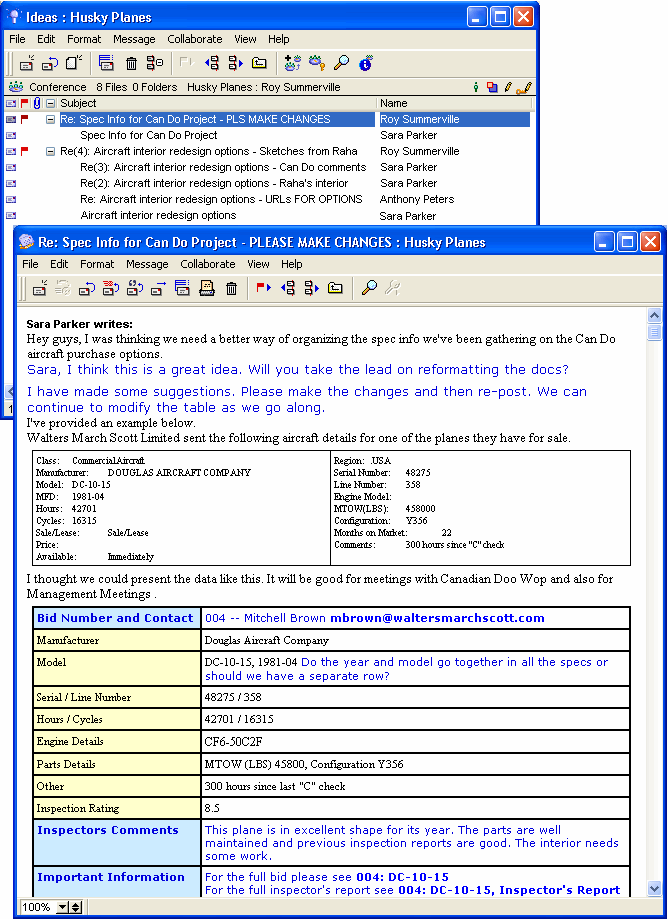
•       If members are using a discussion conference, they can throw out ideas and others can expand on them.
This is a sample conference used for brainstorming. Two conversations (or brainstorming sessions) are occurring, and they are organized by subject using the threading feature.
112006_113847_0.png
•       They can take turns opening the graphic organizer and adding to it, building on each others' ideas.
This is a sample graphic organizer. It is a web diagram that can be used for brainstorming.

HOW SHOULD WE PRESENT THIS PRODUCT? PLEASE ADD CATEGORIES FOR DISCUSSION.

Spec Overview

History

Inspector's Report

Work required

Company's Reputation

Availability
WALTERS MARCH SCOTT LTD.
Commercial Aircraft
Model DC-10-15


Price

Feature list

Photographs


FirstClass makes sure every person's ideas are recorded, regardless of where people are located. It lets people contribute ideas from any location where they have an Internet connection, either simultaneously, or whenever they are ready. You don't need to have everyone gathered around their own computers at the same time. One person posts a message when they are online, and as others login, they can add their own comments. Threading keeps each discussion together.
9203_31808_2.png The next step
Once team members have completed a brainstorming session, they may divide their tasks or simply have a better idea of all the tasks that are required. FirstClass is an excellent task management tool.